Retro
From an internal retrospective tool to a public SaaS product
We built Retro for our own team, then developed it into a product that helps other teams reflect together, agree priorities and leave with actions they can follow up.
Tech Stack
- TypeScript
- React
- Cloudflare Workers
- Durable Objects
- SQLite
- Linear
- Stripe
Core Services
- Product Design
- Web Application Development
- Real-time Collaboration
Additional Services
- SaaS Product Development
- API Integration
- Operational Support
The background
Retro began as an internal Bit Zesty tool. We have since developed it into a public product for teams running sprint, project and other retrospectives.
A retrospective gives people a chance to step back from delivery and discuss what should change. The useful outcome is a decision the team can act on. Capturing the discussion, agreeing an owner and keeping the next step visible are all parts of that work.
We brought those parts together in Retro: a shared board for reflection, prioritisation and actions, with optional meeting structure and a connection to Linear.
As Bit Zesty’s own product, Retro brings together our product design and engineering work.
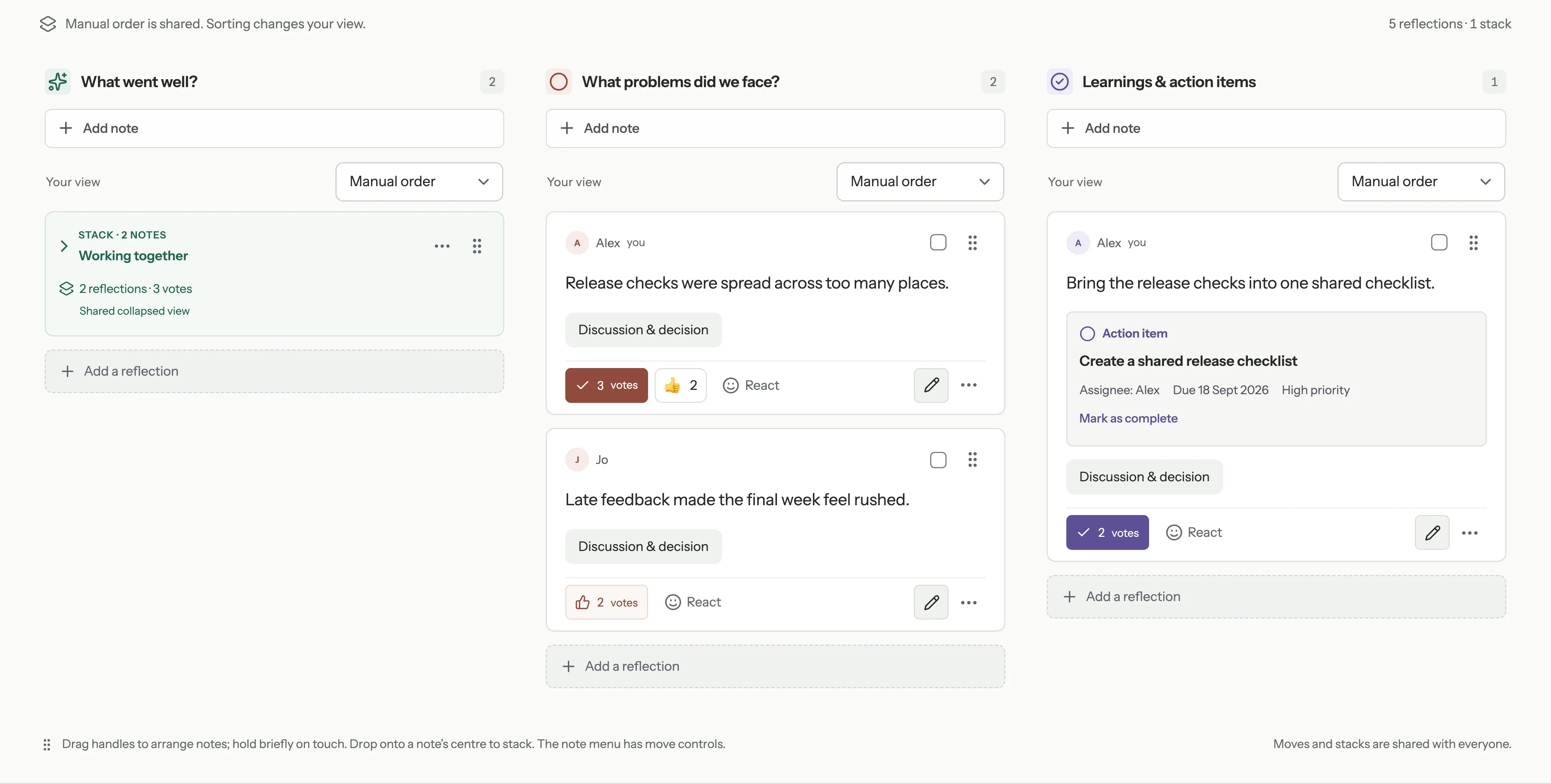
Example content in the Retro interface.
The challenge
An internal tool can rely on a shared understanding of who uses it and how the team works. A public product needs to explain itself and support people with different accounts, tools and meeting habits.
Some teams want a simple board. Others want guided rounds and time to write privately before sharing. A facilitator needs different controls from a participant, and inviting a guest should not mean giving them control of the meeting.
The work also continues after the call. Teams need to return to their decisions, see who owns an action and take the outcome into the tools they already use. For a public service, that experience sits alongside account access, workspace administration and billing.
The work
A shared board that follows the conversation
We built a browser-based application where participants can add reflections in real time, bring related notes into named groups, react and vote on priorities.
The interface keeps individual contributions readable while allowing the team to reorganise the discussion. On smaller screens, participants can switch between columns. Explicit movement controls provide an alternative to dragging notes.
The board can be used without a prescribed meeting process. Facilitators who want more structure can enable the Reflect, Group, Prioritise, Discuss and Agree rounds, with participant readiness, a shared timer and a place to park questions.
Private reflection with a deliberate reveal
Private reflection gives participants time to write before the group sees their notes. Saved private notes remain visible to their author until a facilitator reveals them. Once shared, the notes show their authors’ names.
That distinction shaped the implementation. Private content is filtered for each participant before it is sent from the server, and portable exports exclude unrevealed reflections and voting results. The feature controls when contributions are shared; it does not promise anonymous participation.
Actions that can leave the meeting
A note can become an action with an owner, due date and completion state. The action list gives the team a place to find and review those commitments after the discussion.
Teams using Linear can connect it separately and let a facilitator publish selected actions to an appropriate team and project. This is an explicit step. Creating a board or writing a note does not automatically create issues in another system.
The shared outcomes can also be exported as PDF or JSON, so the product remains useful without a Linear connection.
Making the product available beyond our own team
We added email sign-in alongside Linear sign-in, with individual accounts and workspace administration. A creator signs in; invited participants can join a link-shared board as guests using a name. A participant link gives access to that board, while facilitator permissions remain separate.
The public service has Free and Pro workspace plans. Those plans sit within the account and permission model, so an administrator manages the subscription without requiring every participant or client guest to buy a separate seat.
Production and the internal staging environment use separate storage. That separation lets the team continue developing the product without treating existing internal retrospective content as public launch material.
Engineering for a shared, changing board
Retro uses TypeScript and React, with a Cloudflare Worker and a SQLite-backed Durable Object for each board. WebSockets deliver updates to connected participants.
Each board has one authoritative state. The implementation handles repeated operations, concurrent edits and reconnects, while keeping saved content and permissions on the server. This matters in a collaborative tool: a browser reconnecting or a facilitator changing a meeting round should not silently turn an old request into a new decision.
The result
Retro is available at tryretro.app. A team can use one product to collect reflections, identify priorities, agree actions and retain the outcomes, with optional Linear hand-off.
For Bit Zesty, the work has taken an internal tool into a public SaaS service with its own onboarding, workspace plans and support responsibilities. The product provides a concrete example of designing a focused workflow and building the application, integrations and operating foundations around it.
The next stage is to learn from teams using it in their own meetings: where they hesitate, what they find useful and whether the actions remain useful afterwards.
Try Retro or discuss a product you are developing
Explore Retro if you are preparing a team retrospective. If you are considering taking an internal tool to a wider audience, talk to Bit Zesty about web application development.